Posts

Signup, Login & Authorization

Objective The objective of this assignment is to extend the Address Book application developed in last lab task (Assignment 3) by implementing a user authentication system and role-based access control . Students will create a Signup and Login system and ensure that only authenticated users can perform Create, Update, and Delete operations. Application Requirements 1. Users Data Storage Create a new JSON file named auth-users.json .  This file will store registered users as an array of objects. You can also use mongodb database to store users data. Each user object must contain: id name email password Password hashing is not required for this assignment. 2. Signup (Registration) Feature Create /signup route. On GET request , display a signup form. Form fields: Name Email Password Confirm Password On POST request : Validate password and confirm password. Check if email already exists in auth-users.json . If validation fails, show an error message on signup page. If successful, ...

Download, Parse and Save data

Using HTTP Client library of your programming language of choice, download this page and parse products’ data i.e. image URL, title, description, price. Make an xlsx file that should contain the parsed data. If you are using Python, you can use Requests library to download, BeautifulSoup library to parse. Use pandas library to make xlsx file. If you are using Java, you can use Apache HTTP Client library to download and parse and Apache POI library to make xlsx file.

Create Listing and Detail Page using HTML/CSS of any e-commerce store

On all ecommerce page, there are two common pages: 1. Products Listing Page. It display list of products when uer choose a product category of search products entering some keywords or applying some filtes e.g.  https://www.daraz.pk/smartphones https://myshop.pk/laptops-desktops-computers/laptops 2. Product Detail Page - it display individual product detail e.g. https://www.daraz.pk/products/105-pta-i656021303-s3082667234.html https://myshop.pk/hp-notebook-15-fd0131wm-pakistan.html Create these two HTML pages, you can make design yourself or clone an existing e-commerce design but select popular e-commerce website of any country (above links are just examples). Choose a content rich e-commerce website i.e. do not choose a very simple pages layout that display only few attributes of the product. Use images using online URLs. Particularly focus/practice following: HTML - div, a, img, etc.  Applying CSS selector and basic prop to style links, text, etc. Box Model and Flex Box- t...

Express JS - Track Recently Visited Pages in Session

When a user visits any web page, save the page name and URL in the session as an array of objects. Each object should contain the page name and URL. Create a footer.ejs file to display the list of the 10 most recently visited pages in the footer of every EJS page. Each page should appear as a clickable hyperlink in a separate row. If the user clicks on a link, the corresponding page should open. At the end of the list, include a "Remove All" link to clear the list of recently visited pages in the session. Add an "X" next to each link to allow the user to remove that specific page from the session. After removing a page or clearing the list, redirect the user to the /home page. If a user visits a page that is already in the list, move it to the top and remove the previous occurrence to avoid duplicates.

Express JS - Cookies Handling

Implent below tasks in one npm project. Do not create separate project for each task mentioned below. Add appropriate links in header to make moving from page task to another, easy. These may not be used in real world scenerio as-is, as they are designed to understand working of cookies along with forms, ajax, query string, etc. Task 1: Define and Handle /cookie1 Create a route /cookie1 that sets two cookies:  token and last_visit_timestamp , in the user's browser. When the browser sends these cookies back to the server in next HTTP request e.g. /display-cookies , display their values using the cookie1.ejs template. Additionally, calculate and display the time (in seconds) since the user's last visit by subtracting the last_visit_timestamp cookie value from the current time. Ensure that the last_visit_timestamp cookie is updated with the current timestamp on each request. Refresh the page at random intervals to test its functionality. Task 2: Add Cookie Form at /add-cookie...

AJAX and DOM Manipulation - Fetch, Display, Update and Remove Students Records

Make use of JQuery JavaScript library for AJAX functionality and DOM manipulaiton. Use Bootstrap for layout design. Responsive Design: Large screens (e.g., desktops): The webpage should display a single row with four cells. Medium screens (e.g., tablets): The last two cells should move to a new row. Small and extra-small screens (e.g., phones): All cells should stack vertically. Cell Details and Functionality: Fetch student data from  http://192.155.90.208/students.json   using AJAX and store in students array. Make use of this array for below given functionalities. You can treat, student name as primary key. Cell 1: Add a dropdown menu with a list of countries and a " Load Data " button. When the button is clicked, distinct countries from students array shall be loaded into option list. When a country is selected, display the filtered list of students from the selected country in Cell 2.  Cell 2: Show the student list in a table. The table should have the following colum...

AJAX and DOM Manipulation - Display Monthly Expenses

Layout - R ow 1 Create a Bootstrap row with 3 cells . On large screens, cells should be in a row; on smaller screens, stack them vertically. Cell 1: Fetch expense details using AJAX from  http://192.155.90.208/expenses.json Display months names in e.g. January , February , and March , each in a separate <div> element. Cell 2: When month in cell 1 is clicked, show a table with Sr. # , Expense Category , Total columns in cell 2. Add a Grand Total row at the bottom. Cell 3: Add a “Show Details” button below the table in Cell 2. On click, display a table with Sr. #, Description, Category, Amount columns and a final Total Amount row. Row 2 - Cell 1 Create a form with fields for Description , Category , Amount , and Month , along with an Add button to add a new expense. Choose appropriate input types as needed. When the button is clicked, Row 1 data and behavior shall include the new expense added.

Allama Iqbal Poetry that I Like

گزر جا عقل سے آگے کہ یہ نور  چراغ راہ ہے ۔ منزل نہیں ہے ----   دلِ بینا بھی کر خدا سےطلب آنکھ کا نور دل کا نور نہیں --- حلاج کی لیکن یہ روایت ہے کہ آخر  اک مرد قلندر نے کیا رازِ خودی فاش --- تو اے اسیرِ مکاں! لامکاں سے دور نہیں وہ جلوہ گاہ ترے خاک داں سے دور نہیں --- خضر کیونکر بتائے، کیا بتائے اگر  ماہی کہے دریا  کہاں  ہے --- دل میں ہو سوزِ محبت کا وہ چھوٹا سا شرر نور سے جس کے ملے رازِ حقیقت کی خبر ---  جُراؑت ہے تو افکار کی دنیا سے گزر جا  ہیں بحر خودی میں ابھی پوشیدہ جزیرے کھلتے نہیں اس قُلزُم خاموش کے اٗسرار  جب تک تو اسے ضربِ کلیمی سے نہ چیرے  --- تری نگاہ میں ثابت نہیں خدا کا وجود  مِری نگاہ میں ثابت نہیں وجود ترا  وجود کیا ہے۔ فقط جوہرِ خودی کی نمود کر اپنی فکر کہ جوہر ہے بے نمود ترا  ---   ہر اک منتظر تیری یلغار کا  تری شوخی فکر و کردار کا  یہ ہے مقصد گردش روزگار  کہ تیری خودی تجھ پہ ہو آشکار ---  پروانہ تجھ سے کرتا ہے اے شمع! پیار کیوں یہ جان بے قرار ہے تجھ پہ نثار کیوں پروانہ، اور...

17 Key Insights from Muhammad Raza Saeed's Podcast: Leadership, Innovation, and Pakistan’s Growth

  Just watched a podcast of Muhammad Raza Saeed, CEO Confiz and PakWheels at Thought Behind Things . It was around 2 hours session, here are my 17 take-aways. 1. Everything must be done in a propey way. Processes, not individuals, should drive a company to ensure consistency and quality management. 2. Whatever you do, identify patterns in your service, its where you would find new ideas to work on, areas to innovate by creating products. 3. Software is means to an end, and that end is "the problem it solve". Focus on problems identification and then building solutions to fix them. Digitalization globally is only at 15-20%, offering abundant opportunities for software businesses. 4. Large software platforms are complex and every business is different in operations, even when they are doing same stuff. People are needed to customize platforms to meet specific requirements. Here is the opportunity you can tap. 5. Business opportunities lie not only in grand challenges but also i...

How to start freelancing in software development?

A student asked about how to start feelancing at reddit. Here are a couple of points I shared. I found it a bit cool, so I thought to share with broader audience: 1. Pick one skill and master it thoroughly by learning from 3-4 different sources (e.g., Coursera, Udemy, edX, YouTube, etc.). Complete 2-3 academic projects to apply what you've learned. Try to incorporate most of the features or tools often demanded in related projects within the chosen tech stack. Start by selecting a technology that has good demand nowadays and in which you already have some experience (this is recommended but not required). Choose something you enjoy working with. Once you've made your choice, stick with it for at least 3-4 years. This could be MERN, MEAN, React Native, Shopify, Odoo, Java/Spring, Flutter, .NET, Laravel, Salesforce, ERPs, Blockchain, Web3, integrations, ML/AI, automation, web scraping, data processing, crypto, or something else. The key is to pick one and stick to it unless you h...

Express JS - Server Side Basics and Form Handling

Updated on: Dec. 2, 2025 Below listed programming tasks are designed to practice different concepts of server side web programming using Express JS and related packages. These small tasks are designed to understand the core web concepts' implementation. Before you implement below tasks, its suggested to go through provided code samples, run and understand them. It would make it easy to do the below tasks. To complete this task, you need to understand: Starting server in express that listen for HTTP requests Maping HTTP request to a handler defined in express. based on HTTP Method and URL Pattern Reading query string parameters using req.query object Using EJS to render dynamic data Here is the task description: Make a header in header.ejs and include this header in all EJS templates you create. In same way, make a footer in footer.ejs and include it all other EJS tempates. In script where you define your request handlers, initialize a global array of objects where each object s...

Create an Address Book using Express and EJS

 Create an application using Express, the application shall have following features: Make a JSON file named users.json. It shall be an array of objects where each object shall represent a contact person detail. Only 2-3 records are sufficient. Use following fields for each object: name, gender, email, city, phone number. Below given description is about different operations that you shall implement in your app to perform CRUD operations on file. List all records:  At /home ... list only contact persons' names in tabular form. The table shall have columns: ID, Name, Operations. Display user ID in ID column, Operations column shall have two links or buttons i.e. Update, Delete. When these links or buttons are clicked, pass user id to /update and /delete handler. Update Record When user click Update link or button, GET request shall be sent to server to URL pattern /update. Pass user id as query-string e.g. /update?id=10. The /update handler shall open the Update Form where earli...

Event Handling and DOM Manipulation - Basic Tasks

Here are a couple of tasks related to event handling and DOM manipulation. These are very basic and micro level tasks. I suggest to complete these before moving to complex ones or JavaScript assignment. Most of these tasks are designed to practice common use cases of form handling, event handling and DOM manipulation. So do not worry, if you feel, a task do not represent genuine requirement. Task 1 Get a number from user in a text field. Add a standard button below that field. When the button is clicked, in alert box, show the square of number. e.g. if user entered 6, in alert, show 36. Task 2 Create two text input fields to get two numbers from user. Make a group of radio buttons with options: Add, Subtract, Multiply, and Divide. Then, add a standard button labled "Calculate", when the button is clicked, perform the selected arithmatic operation and display the result in a div below the button. Task 3 Make a hyperlink and set values for following attributes: href, title, tar...

AJAX and DOM Manipulation

If you know JQuery JavaScript library, you can use it to make AJAX calls and to manipulate DOM to fullfil below requirements. On page load, fetch users from http://192.155.90.208/users.json using AJAX and show only names in Column 1 of your web page. Each user name shall be in a separate div (so all names would be vertically stacked). Add an HTML form in Column 2 of you web page that shall have input fields i.e. name, gender, interests, country and city of type text, radio, checkboxes, and dropdown lists, respectively and a standard button labeled as Show Data . When a user name in Column 1 is clicked, populate the form’s all input fields accordingly. See users.json, only given values shall be listed as valid values for gender and interests in the form. (You can expect no other value for interest would appear or is valid, so feel free to hard code list of checkboxes, but if you create them dynamically, that is better but not required). Althought there would be multiple checkboxes, but...

Bootstrap Practice Tasks

Task 1 Create a layout that shall have 4 info widgets.  On extra small devices, all shall be stacked On small and medium screen, there shall be 2 widgets in one row (hence there would be total two rows) On large and above, all columns shall come in single row Task 2 Create a layout that shall have 3 cells: On extra small and small devices, all shall be vertically stacked On medium and above, first row should have 2 cells and 2nd row should have one cell. Cell in 2nd row should be of 50% width and it shall coe in center of row. Task 3 Create a layout that shall have 6 cells. on extra small devices, all shall be vertically stacked.  On small and mediun devices, 2 cell per row.  On large and above, 3 cell per row Task 4 There shall be one “row” with 3 cells, all shall be vertically stacked on all devices, except extra small devices (means on extra small devices, all cells shall be of equal width and come in single row). Task 5 There shall be one “row” with 2 cells, each cell...

Express Form Handling, File Upload, EJS, Redirect

Consider below HTML form. Its not mandatory to use same form, you can modify fields. What is important is, your form shall include all basic types of input fields e.g. text, password, radio, checkbox, option list, text area, etc. After this form, there are list of tasks that you should implement in same web app. <title>Form with all controls</title> <style> label { display: inline-block; width: 100px; }</style>  <h1>User Registration Form</h1> <form action="form-handler" method="POST">   <h2> Student Registration Form</h2>   <label>Name</label><input maxlength="8" name="name" size="20" type="text">   <label>Password</label> <input name="password" size="20" type="password">    <label>Subjects</label>   <input name="Algorithms" type="checkbox"> Algorithms   <input name=...

Practice JavaScript, Setup Node, NPM and Explore Some Methods of HTTP Module

Prepare code samples to demonstrate usage of following concepts in JS: Fat Arrow functions Create modules, export it and use it by importing into another module Create classes that extends another class. create its object and use it. Spread operator with usage in arrays and objects Object Destructuring Please make use of validator packages and validate different types of data using:  https://www.npmjs.com/package/validator Makeuse of different methods in string module  https://www.npmjs.com/package/@stdlib/string you an use any module from npm. searcing "string utils" Create different http handlers to perform following tasks (you can do each task in different file too): extract data received in query string and write that data to http response. For example, if user send request to a url like below: http://localhost:8000/processdata?name=ali&age=20&city=Lahore  The handler should write these data attributes on response. Send custom headers to response e.g. C...

Reading an Excel File and Submitting a Web Form Using Selenium Java

Image
Pre-requisites: geckodriver.exe maven dependencies for apache poi & Selenium <dependency> <groupId>org.seleniumhq.selenium</groupId> <artifactId>selenium-java</artifactId> <version>4.1.1</version> </dependency> <!-- https://mvnrepository.com/artifact/org.apache.poi/poi --> <dependency> <groupId>org.apache.poi</groupId> <artifactId>poi</artifactId> <version>5.2.2</version> </dependency> This automation process is divided into two parts: Reading from an Excel file  WebForm Automated Filling & Submission Reading an MS Excel File Using Apache POI: Apache POI is an open-source java library developed and distributed by Apache Software Foundation to design and modify MS...

How to Clear Cache in Chrome Using Selenium Webdriver Java

Image
Selenium is an open-source web-based automation tool that is implemented using a web driver.  We will be using chromedriver  because Selenium 3 enables chrome driver as the custom WebDriver implementation for the Chrome browser. Pre-requisites: chromedriver.exe maven dependency selenium <dependency> <groupid>org.seleniumhq.selenium</groupid> <artifactid>selenium-java</artifactid> <version>4.1.1</version> </dependency> Steps: The following 6 steps will automate the process: Set webdriver.gecko.driver and its' path as a system property. Set the firefox diver. Typecast web driver as Javascript executor.  Browse the website. Get a clear cache button using the Javascript path. Execute the following script to execute and hit click: return document.querySelector("body > settings-...

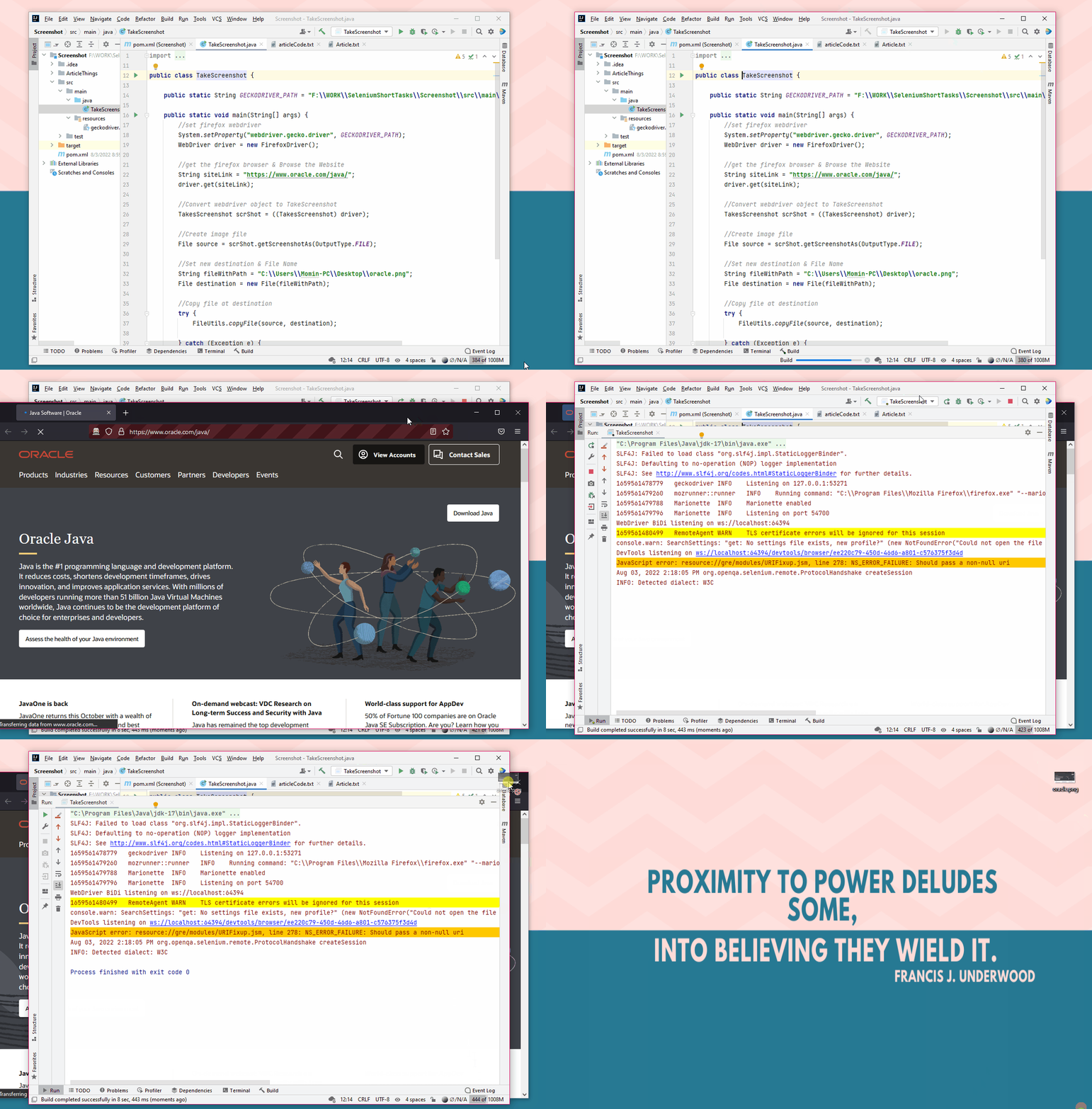
How to Take a Screenshot Selenium Java

Image
Selenium is an open-source web-based automation tool that is implemented using a web driver.  We will be using geckodriver because Selenium 3 enables geckodriver as the default WebDriver implementation for Firefox. Pre-requisites: geckodriver.exe maven dependency selenium <dependency> <groupid>org.seleniumhq.selenium</groupid> <artifactid>selenium-java</artifactid> <version>4.1.1</version> </dependency> Steps: it takes 4 simple to take a screenshot: Set webdriver.gecko.driver and its' path as a system property. Set the firefox diver and browse to the website. Convert webdriver object to TakeScreenshot . Use the built-in function to get screenshot and save as file. Let’s see all the above steps in the code. We will use getScreenshotAs(OutputType>X< Target) function to take screenshot. import org.apac...