Posts

Task 4a - Position, Box-Sizing and Opacity CSS Properties
Image
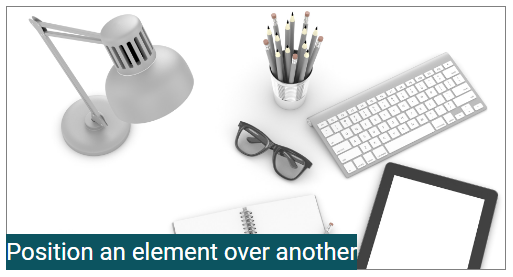
There are two very useful properties in CSS i.e. position and box-sizing. You must have good understanding how both of these work. Below I have explained two tasks that should help you to understand them. Position and Opacity Before doing this task, I suggest you read basics of different values of position e.g. static, relative, fixed, and absolute. Then do the below task to see how position of one element can effect others. Using position property you can change the default position of an element on HTML page. From below screen you can see, the element with text is placed at top of image. A container div contains img and text (in span element). The text has property postion:absolute & bottom:0px and the container div has the property postion:relative. Below is how it looks like. You can clearly see, the text element is placed at top of the image. If we change the text span to div and apply width property, it shall look like this: Though the text div is placed on image but...
Blogger Theme / Template Tutorial

I'm exploring Blogger theme structure to customize it. I want to write learning notes along the way. So, this post is work-in-progress, so don't consider it complete. To understand this tutorial, you shall know Blogger basic usage e.g. adding new posts in Blogger blog, creating new pages, assigning labels, etc. and you shall have basic knowledge of HTML, CSS and programming e.g. variables, if/else, loops etc. My objective is to explain basic concepts and building blocks of blogger theme, I do not intend to build a professional looking theme. There are following points, you must understand to work on Blogger templates: Basic Concepts Style Variables Data Tags Widget Tags Structure of Theme Basic Blogger Template Concepts Its important to understand different types of web pages that blogger offer. Understanding page type is important as in custom theme you need to embed different contents based on the type of page e.g. images slider at home page only, specific backgrou...

How to Setup SSL Certificate in Tomcat 8 - Received from SSLS.COM

Configuring SSL certificate in Tomcat first time may take lot of time. SSL certificate setup in Tomcat is not straight forward for two reasons: There are different type of SSL certificate files and follow different encodings, depending on the certificate provider There are may differences in configuration steps in different versions of Tomcat I recently configured SSL certificate for one of my website, the certificate was pruchased from SSLS.com for obvious reasons i.e. their rates are very good.  How to get SSL Certificate from SSLs.com Purchased SSL certificate from  www.ssls.com To generate and download SSL certificate, we need to provide CSR (Certificate Signing Request) in SSLs.com account. Enter your website details at  https://www.digicert.com/easy-csr/openssl.htm , it would generate the command.  Enter that command in Linux CLI, it would generate the CSR file and KEY file (its your private key so must be kep confidential). We would later use...

How to Send Email using Mailgun PHP API

1. Create an account at Mailgun.com , you would get API Key and a sandbox domain for testing. You shall later add your custom domain too. 2. Create a sample project folder and install Composer. mailguntest is out project name, you can change as per your requirement. >mkdir mailguntest >cd mailguntest >curl -sS https://getcomposer.org/installer | php Once Composer is installed, add Mailgun PHP API / library too. >php composer.phar require mailgun/mailgun-php:~1.7.1 I have used version 1.7.1, you can use any. see https://packagist.org/packages/mailgun/mailgun-php for details. 3. In mailguntest folder, create mailer.php file with below contents: Update the code as per your mailgun code settings: <?php require 'vendor/autoload.php'; use Mailgun\Mailgun; $mg = new Mailgun("write your API key here"); $domain = "write-your-sandbox-domain for testing"; $mg->sendMessage($domain, array( 'from' => 'postmaster@write-your-sa...

adsys schema

CREATE TABLE `ads` ( `id` int(11) NOT NULL AUTO_INCREMENT, `title` varchar(255) DEFAULT NULL, `price` float DEFAULT NULL, `category_id` mediumint(9) DEFAULT NULL, `mobile_no` varchar(255) DEFAULT NULL, `condition` varchar(255) DEFAULT NULL, `picture_file_name` varchar(45) DEFAULT NULL, PRIMARY KEY (`id`) ) ENGINE=InnoDB DEFAULT CHARSET=latin1; CREATE TABLE `categories` ( `id` mediumint(9) NOT NULL AUTO_INCREMENT, `name` varchar(45) DEFAULT NULL, PRIMARY KEY (`id`) ) ENGINE=InnoDB DEFAULT CHARSET=latin1;

How to Create and Remove Cookies in PHP Web Applications and How Do They Work

Image
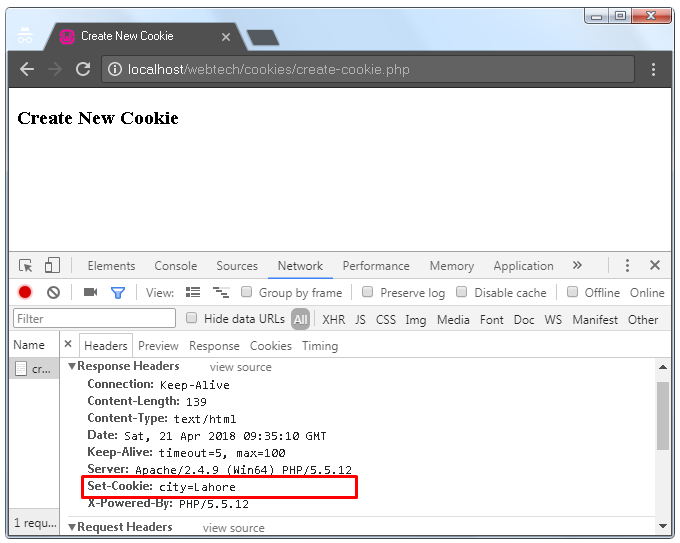
First I would explain basics cookies in web applications and how they work. Then, I have listed the PHP code to create, read and remove cookies with brief description of each task. Its comprehensive post, so feel free to not read in one sitting, take breaks but absorb as you read. What are Cookies A cookie is data in the form of key value pair e.g.  city=Lahore, id=90,  that is stored in user's web browser. Cookies are created in web browser on the instuction of web server. Once some cookies are create/stored in web browser (we would shortly see how to create them), when user send new requests to same web application, existing cookies are automatically added in HTTP request by the web browser. So the data stored by web developer in user browsesr (in the form of cookies), automatically reaches back at server in subsequent requests. When web server send instruction to create a new cookie, it also send cookie expiry time to browser (or default time is used, explained later)...

How to Use Sessions in PHP Web Applications

Image
How does session work in web applications , covers basic concepts of session management. If you are new to web sessions, you should read that post first. This article follows code centric approach i.e. it contains different code samples with brief description. It covers: how to create a session in PHP, how to put some data in session, how to get data from session, how to remove specific data element from session or all of the session data at once. Consider it a reference article of code samples of PHP Sessions. How to Create New Session in PHP The below PHP file i.e. create_session.php creates new session at web server when the page is accessed from browser. session_start() method is used to create a new session. When session is created, a unique session ID is generated, we can read the value of session ID by calling session_id() function. Server send the generated session ID to browser where it is stored as cookie, named PHPSESSID. When user send another request, browser ...